 |
 |
|
The Zacharias Schömbs Family Tree A árvore genealógica da família Zacharias Schömbs Welcome to the Schömbs Family Tree Bem-vindo à árvore genealógica da família Schömbs This Webpage offers the family tree of Zacharias Schömbs (1645-1707) of Undenheim. Those citizens of the world with the family names of SCHÖMBS, SCHOEMBS, SCHOMBS, SCHEMBS, SCHAMBS, and SCHEMES are all descended from Zacharias. Many people in the tree have descended through female lines, and obviously have different surnames. Esta página da Web mostra a árvore genealógica de Zacharias Schömbs (1645-1707) de Undenheim. Todos os cidadãos do mundo com os sobrenomes SCHÖMBS, SCHOEMBS, SCHOMBS, SCHEMBS, SCHAMBS e SCHEMES são descendentes de Zacharias. Muitas pessoas na árvore são descendentes da linha materna e, obviamente, têm sobrenomes diferentes.
As of 2013 we are using a new Family Tree program. Here are some tips to get started. I suggest keeping this window open so you can refer to it.
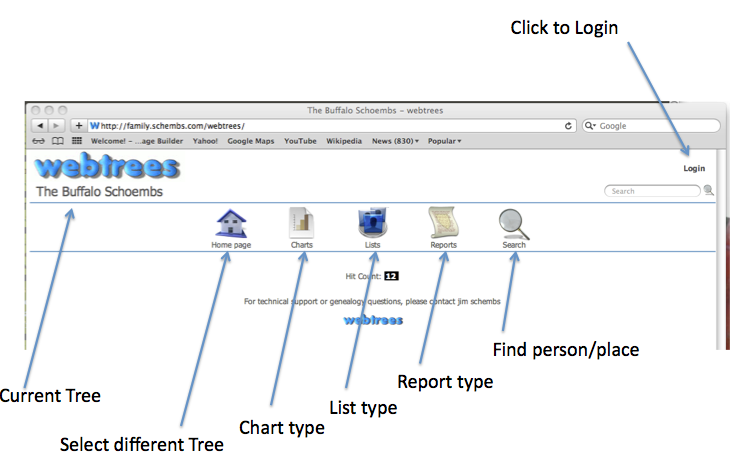
If you need to Login, use the same Username and Password as you did for www.schembs.com. But you may not need to. Se você precisar fazer login, use o mesmo nome de usuário e senha que usou para www.schembs.com. Mas talvez não precise fazer isso Notice which Tree is currently being presented. To select a different tree put the cursor on the Home Page icon and select a different tree. At the present time (2026) there is only one tree. Observe qual Árvore é apresentada no momento. Para escolher uma árvore diferente, coloque o cursor no ícone Página inicial e escolha uma árvore diferente. No momento (2026), só tem uma árvore.. You can select different Chart, List and Report types by putting the cursor on the appropriate icon and selecting which you desire. Personally, I think the Interactive Chart is the easiest to use. Select it from the "Chart type" pulldown. Você pode escolher diferentes tipos de Gráfico, Lista e Relatório colocando o cursor no ícone certo e escolhendo o que quiser. Pessoalmente, acho que o Gráfico Interativo é o mais fácil de usar. Escolhe-o no menu suspenso «Tipo de gráfico». To find a person or place, use the Search icon. You can search for someone's given name or family name. Or a town where they were born, married or died, if it is in the database. Try to use a search term which is somewhat unique, if possible. As an example, if the person's name is Johann Ezekiel Schömbs, search for Ezekiel. From the list of matches, select the person of interest. If your search finds a lot of results, it will present a second level of search. In otherwords, after searching for last name it will then ask you to narrow the list by asking for the first letter of the given name -- "Individuals (given names) with surname SCHÖMBS". Para encontrar uma pessoa ou lugar, use o ícone Pesquisar. Você pode procurar pelo nome ou sobrenome de alguém. Ou uma cidade onde nasceram, casaram ou faleceram, se estiver na base de dados. Tente usar um termo de pesquisa que seja um pouco único, se possível. Por exemplo, se o nome da pessoa for Johann Ezekiel Schömbs, procure por Ezekiel. Na lista de resultados, escolha a pessoa que te interessa. Se a tua pesquisa encontrar muitos resultados, será apresentado um segundo nível de pesquisa. Por outras palavras, após pesquisar o sobrenome, vai ser solicitado que restrinjas a lista, indicando a primeira letra do nome próprio — «Indivíduos (nomes próprios) com o sobrenome SCHÖMBS». For the Charts you might be presented a Configuration Template as shown below. IT IS NOT NECESSARY TO USE IT. Para os gráficos, pode aparecer um modelo de configuração como mostrado abaixo. NÃO É PRECISO USAR ISSO. 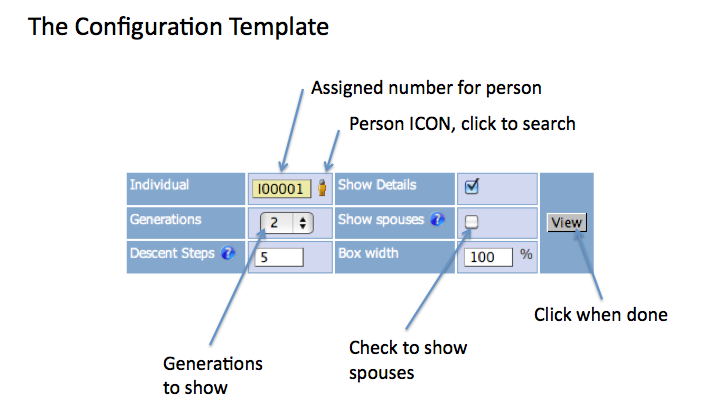 Here you can change the options. Some charts in order to be more compact do not show spouses. Put a check in the box to show spouses. Aqui você pode alterar as opções. Alguns gráficos, para serem mais compactos, não mostram os cônjuges. Marque a opção para mostrar os cônjuges. Family Book Chart: Use the scroll bars to move around the chart. Gráfico do livro da família: Use as barras de rolagem para movimentar o gráfico. Hourglass Chart: To expand to the left or right use the Scroll Bar and/or arrows in the left/right margins. Gráfico da ampulheta: Para expandir para a esquerda ou direita, use a barra de rolagem e/ou as setas nas margens esquerda/direita. Interactive Tree Chart: You can grab and drag the chart left and right. BUT you need a special cursor to do so. Move the arrow cursor to a part of the chart where it turns to a plus sign with a arrow heads at each of the four ends. This is usually right next to a box. Then hold the cursor down and drag. To see additional information on a person, put the cursor on their box. The cursor will turn into a "?". Click the cursor to expand the box. Click again to close. I think the Interactive Tree Chart is the easiest to use. Gráfico interativo em árvore: Você pode pegar e arrastar o gráfico para a esquerda e para a direita. MAS você precisa de um cursor especial para fazer isso. Mova o cursor de seta para uma parte do gráfico onde ele se transforma num sinal de mais com pontas de seta em cada uma das quatro extremidades. Isso geralmente fica bem ao lado de uma caixa. Em seguida, mantenha o cursor pressionado e arraste. Para ver informações adicionais sobre uma pessoa, coloque o cursor na caixa dela. O cursor vai se transformar num «?». Clique no cursor para expandir a caixa. Clique novamente para fechar. Acho que o Gráfico Interativo em Árvore é o mais fácil de usar. Individuals List: Click on the first letter of the person's family name, then select the family name, and finally the person of interest. It will take you to the Interactive Tree for the person. Lista de pessoas: Clique na primeira letra do sobrenome da pessoa, depois escolha o sobrenome e, por fim, a pessoa que te interessa. Vai te levar à árvore interativa dessa pessoa. Place Hierarchy: This list gives every town in the database. Selecting a town will give you everyone with an event in that town. In theory it will also show the town on a map, although the mapping function does not seem to be working at present. Hierarquia de lugares: Essa lista mostra todas as cidades que estão no banco de dados. Ao escolher uma cidade, você vai ver todas as pessoas que têm um evento lá. Em teoria, também mostra a cidade num mapa, mas parece que a função de mapeamento não está funcionando agora. Reports: Select the report type, then the person for whom you want the report and number of generations. If you know the ID number of the person, you can enter it as a shortcut. Click "Download report". Relatórios: Selecione o tipo de relatório, depois a pessoa para quem queres o relatório e o número de gerações. Se você souber o número de identificação da pessoa, pode colocá-lo como um atalho. Clique em «Baixar relatório». Dates of Events: In order to not disclose the birthdates of living family members, the program has been altered to only display the year. Unfortunately it does this for both the living and the departed. Perhaps in the future we will be able to find a way to display complete information for the departed. Datas dos eventos: Para não mostrar as datas de nascimento dos familiares vivos, o programa foi alterado para mostrar só o ano. Infelizmente, isso acontece tanto para os vivos quanto para os falecidos. Talvez no futuro a gente consiga achar uma maneira de mostrar as informações completas dos falecidos. The Family Tree Program has been Altered: Much of the functionality of the family tree program has been disabled. If you drill down you might find some features which are not working. In this case your Back button will come in handy. O Programa da Árvore Genealógica foi alterado: Grande parte das funcionalidades do programa da árvore genealógica foi desativada. Se você explorar o programa, poderá encontrar alguns recursos que não estão funcionando. Nesse caso, o botão Voltar será útil. Google Maps Unfortunately the Google Map function does not seem to be working. Hopefully this can be rectified as this would be helpful. Google Maps Infelizmente a função Google Map parece não estar funcionando. Espero que isso possa ser corrigido, pois seria muito útil. Comments? Please send along your comments on the Family Tree or the website in general. On the website click on "Contact" in the navigation bar on the top of each page. Comentários? Por favor, envie os teus comentários sobre a árvore genealógica ou o site em geral. No site, clique em «Contato» na barra de navegação no topo de cada página. |